Lifetime deal PRO Unlimited, every site you run, one payment of £149. No renewals, ever. Ends 28 November. Get lifetime access

A clearer view of every cache

Your content changes.
Your cache should too.

Cache Watch works alongside the cache plugin, host and CDN you already use. It doesn’t replace them. It detects changes, flushes the right URLs on every layer and warms them again.

The free plugin is free forever, on as many sites as you like. No account or licence needed.

↻

CACHE STATUS

Changes detected

  • Product page updated
  • Targeted cache flush
  • Page warmed for visitors

See it in action

Every cache, in plain sight

Real screens from the plugin inside WordPress, shown on a demo site. Pick a screen to take a closer look.

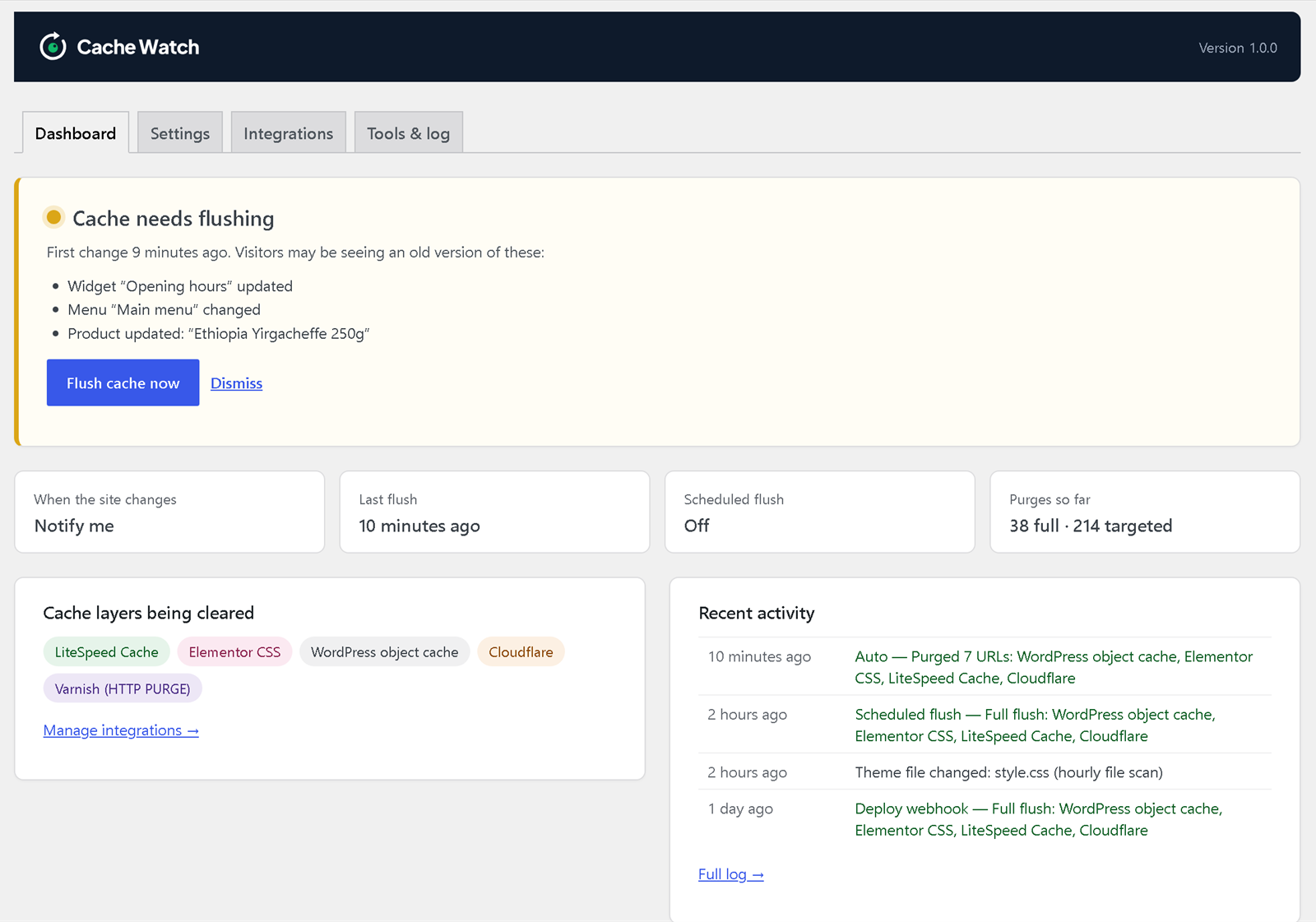
Cache Watch dashboard showing that the cache needs flushing, what changed and which cache layers are cleared

Click the screenshot to open it full size.

What it covers

Knows what changed, and which pages it affects

Editing one product shouldn’t wipe your whole cache. When a change only affects some pages, Cache Watch clears just those pages, and site-wide changes flush everything. It can clear automatically or tell you first, then warms the cleared pages again. All of this is in the free plugin.

  1. Something changesAn edit, a stock change, a deploy
  2. It works out the reachA few pages, or the whole site
  3. Every layer is clearedAutomatically, or when you click
  4. Pages are warmed againSo visitors get fast pages

Posts, pages and custom post types

Published, updated, unpublished, trashed or deleted

  • The page itself
  • Home page and RSS feed
  • Its category, tag and custom taxonomy pages
  • Post type archive and blog page
  • Author archive, and date archives for blog posts
  • The old URL too, if the slug changes
  • Comment approvals and moderation clear that post

WooCommerce

Products published, edited in WordPress, unpublished or deleted, and stock level changes

  • The product page
  • Shop page and home page
  • Product category and tag pages
  • Stock changes from orders, restocks and edits
  • Variation stock changes clear the main product

Custom fields

ACF and other custom fields

  • Fields saved when you update a post, page or product in WordPress clear that item’s pages, like any other edit
  • ACF options pages (site-wide settings) flush the whole site

Categories, tags and taxonomies

Edited or deleted, including product categories

  • That archive page
  • Home page

Site-wide changes

Flush every cache layer

  • Menus, widgets and the Customizer
  • Site title, tagline, logo and icon
  • Homepage, reading and permalink settings
  • Block theme templates, styles, patterns and navigation
  • Theme switches, plugin activations and updates

Changes WordPress never sees

Hourly scan of your active theme and plugin files

  • FTP uploads
  • Git and deploy-script releases
  • Edits in the theme or plugin file editor

Clears the caches you already use

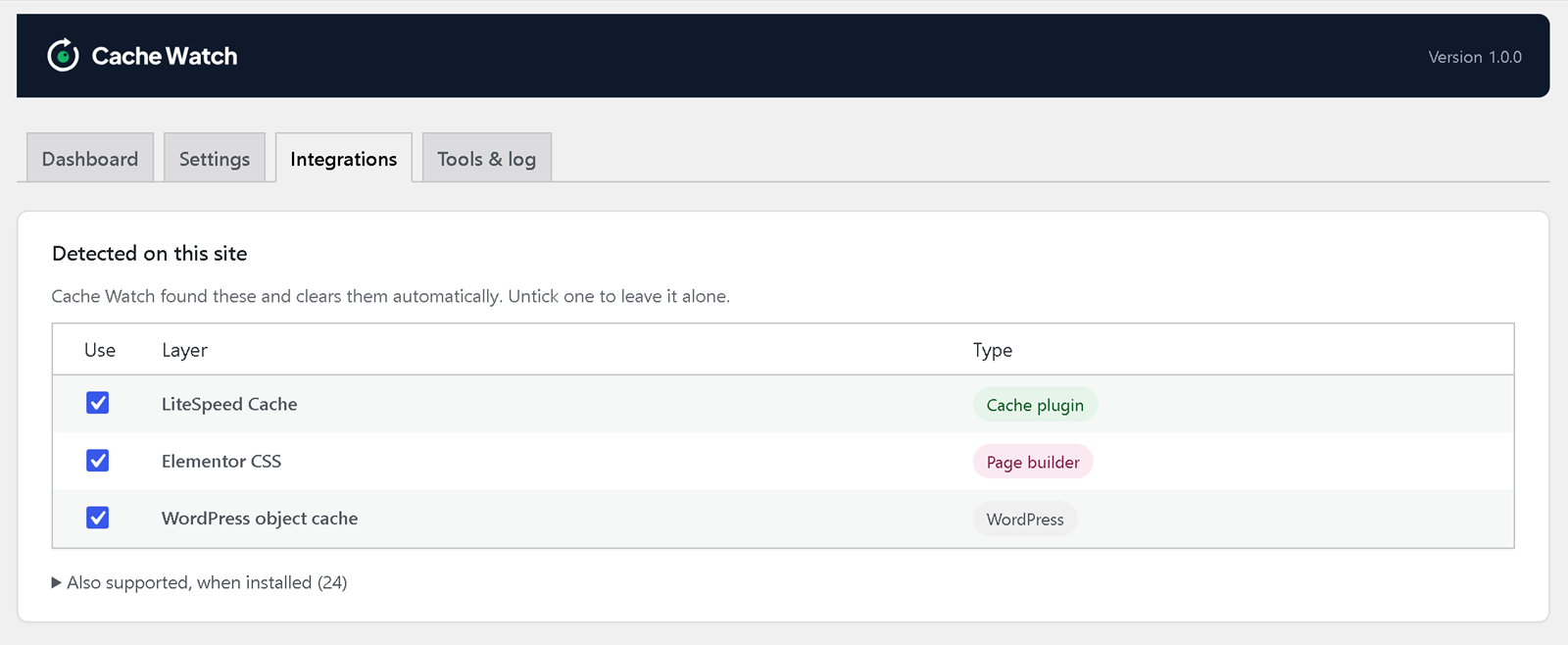
Cache plugins and hosts are detected automatically. Cloudflare, Bunny CDN and Varnish take a quick setup.

Cache plugins
  • WP Rocket
  • LiteSpeed Cache
  • W3 Total Cache
  • WP Super Cache
  • WP Fastest Cache
  • WP-Optimize
  • FlyingPress
  • Cache Enabler
  • Hummingbird
  • Swift Performance
  • Comet Cache
  • Autoptimize
Hosts
  • Kinsta
  • WP Engine
  • SiteGround
  • Cloudways (Breeze)
  • Pantheon
  • GoDaddy Managed WordPress
  • Pagely
  • SpinupWP
  • Pressable
  • WordPress VIP
CDN and server
  • Cloudflare
  • Bunny CDN
  • Varnish
  • Nginx Helper
Page builders
  • Elementor
  • Divi
  • Beaver Builder
Object cache
  • WordPress object cache
  • Redis
  • Memcached

Cloudflare in front of your site, but no plugin?

Paste a Cloudflare API token into Cache Watch and it purges Cloudflare directly. It finds your zone automatically, clears only the changed URLs and has a Test connection button. You don’t need the Cloudflare plugin.

Choose the right watch

Free to start. PRO when you need more.

The free plugin does the cache work. PRO is an add-on that sits on top of it, with alerts, history and tools for teams that want more visibility.

FeatureFreePRO
Cache control
Detects content, settings and file changes✓✓
Notify me or flush automatically✓✓
Scheduled flushes and cache warming✓✓
Cache plugin, host and CDN integrations✓✓
See every cache layer
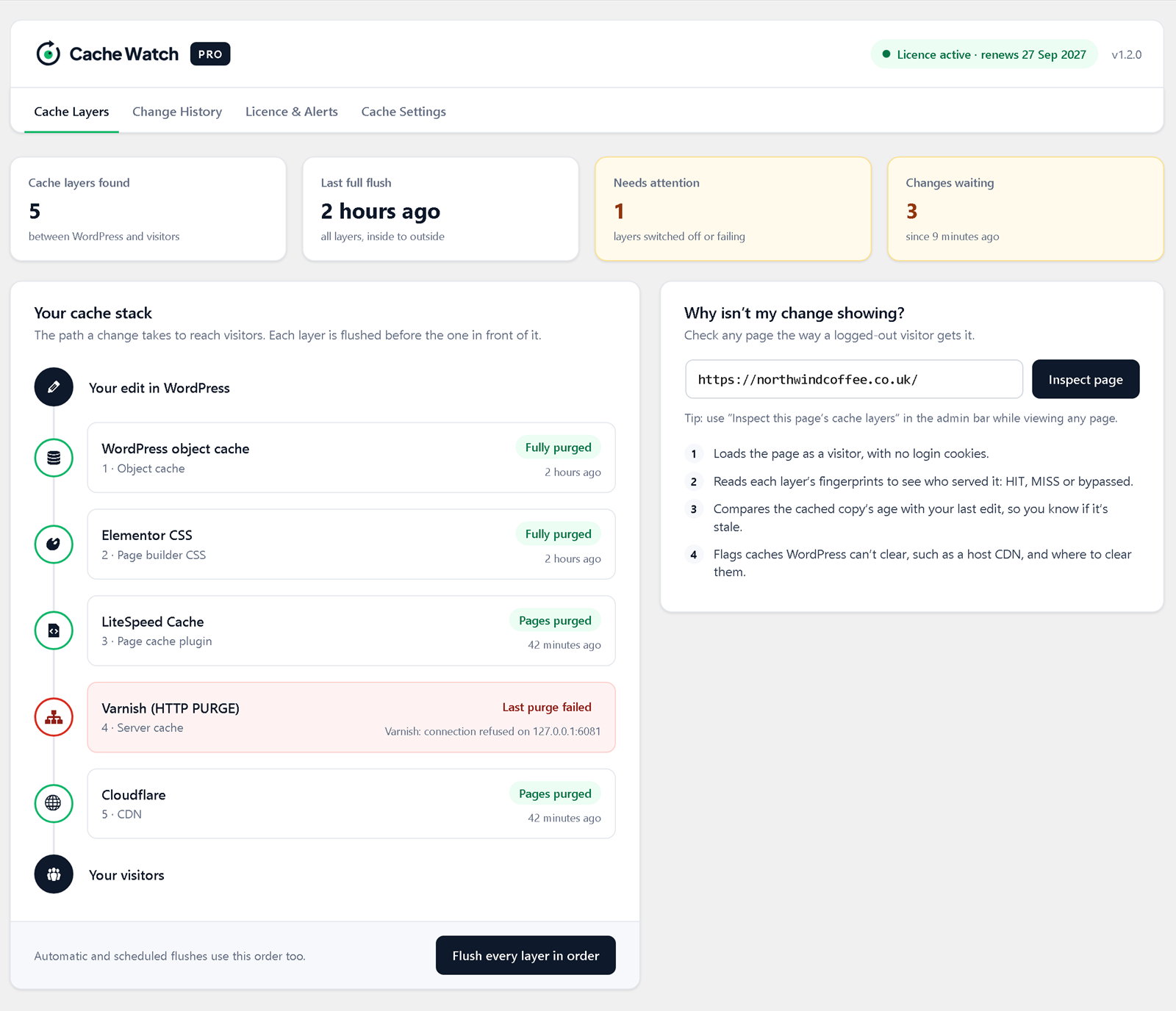
Cache layer map: every layer in one view–✓
Flushes layers in the right order, inside to outside–✓
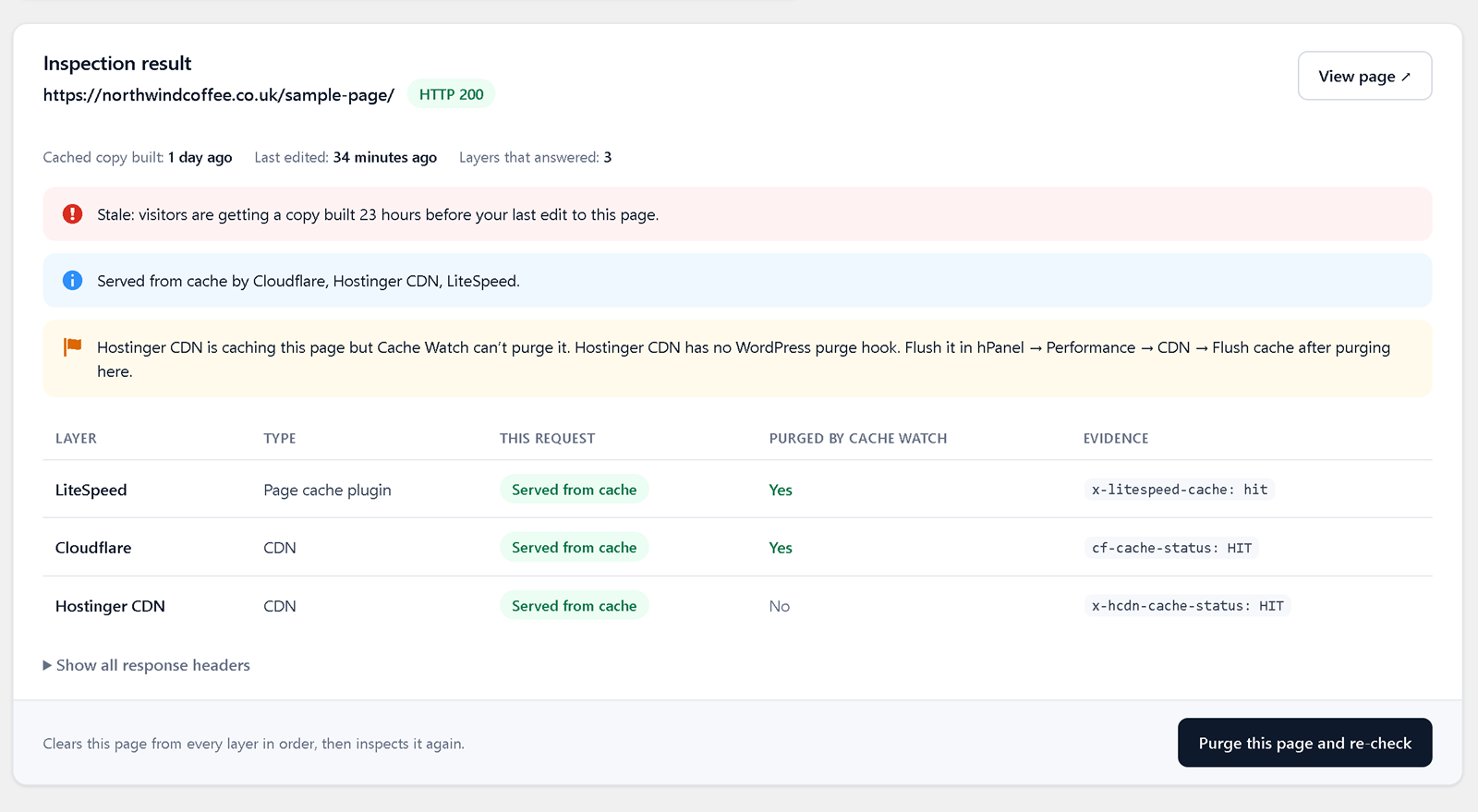
“Why isn’t my change showing?” page inspector–✓
Stay informed
Email and Slack alerts–✓
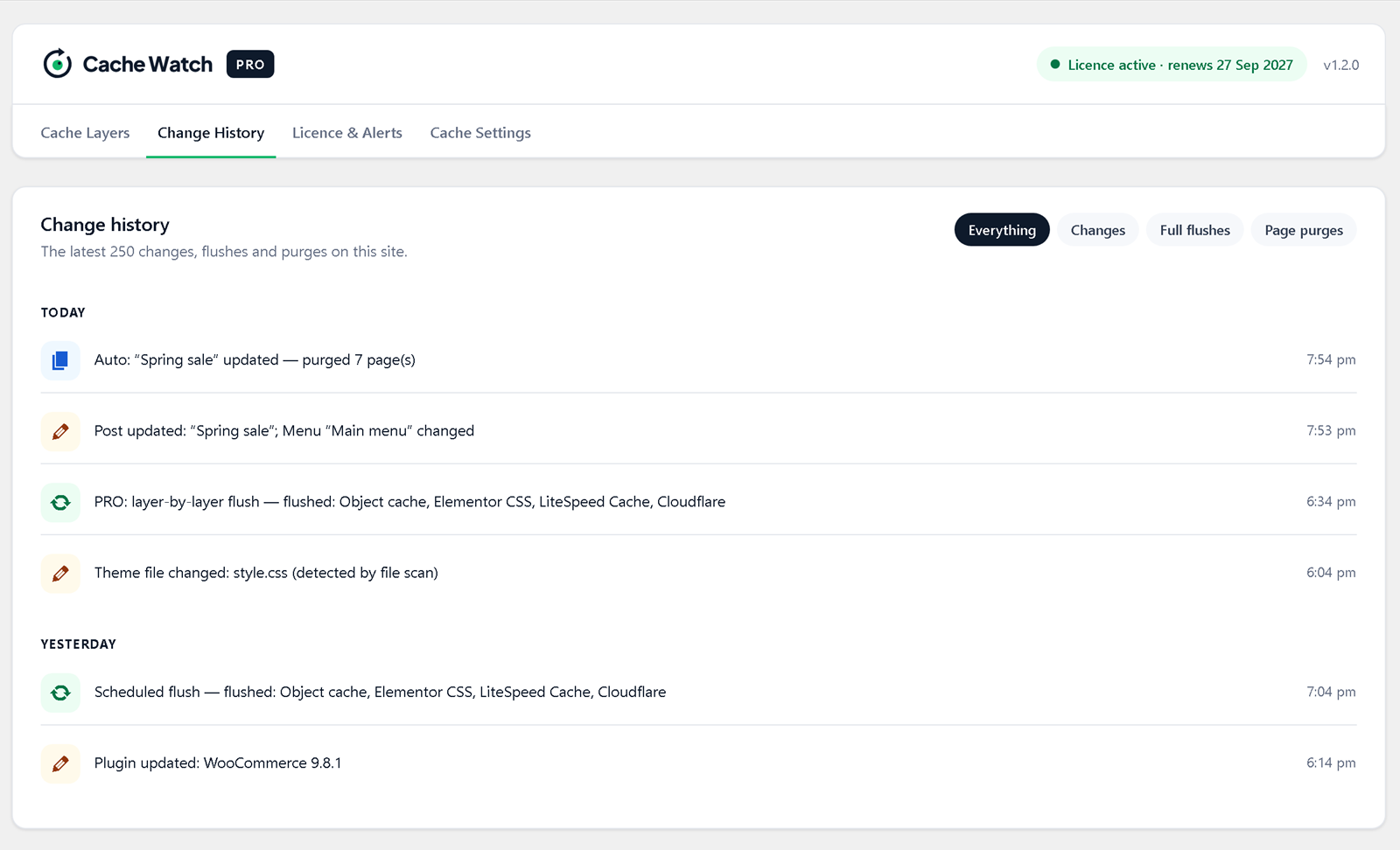
Full change and flush history–✓
Saved page flush rules–✓
Updates and support
Private updates and priority support–✓

Simple pricing

Free forever. PRO when you need more.

The free plugin does the cache work on every site you run. PRO adds visibility on top, priced by how many sites you manage.

Always free
Cache Watch Free

£0 forever

Unlimited sites

No account or licence key needed

  • Change detection
  • One-click or automatic flushes
  • Scheduled flushes and warming
  • Cache plugin, host and CDN integrations
Download free
PRO Single site

£19 £9 first year

1 site

Then £19/year. Cancel any time.

  • Everything in Free
  • Cache layer map + inspector
  • Email + Slack alerts
  • Change history + page rules
  • Private updates, priority support
Choose Single site
Lifetime deal · ends 28 Nov
PRO Unlimited · Lifetime

£199 £149 once

Unlimited sites

Pay once, no renewals. Only until 28 November.

  • Everything in Free
  • Cache layer map + inspector
  • Email + Slack alerts
  • Change history + page rules
  • Updates and priority support for life
Get lifetime access

Launch prices on yearly plans apply to your first year, then your plan renews at the standard yearly price. The lifetime deal is a single payment with no renewals, available until 28 November 2026. Prices include VAT where it applies. Secure checkout by Stripe; manage or cancel any time in the billing portal.

Good to know

Frequently asked questions

Do I still need the free plugin?

Yes. PRO is an add-on: keep the free Cache Watch plugin installed and active, then install PRO alongside it. PRO uses the free plugin’s cache detection and flushing and adds alerts, history, page rules and private updates.

Does it work with WooCommerce?

Yes. It detects products being published, edited in WordPress, unpublished or deleted, and stock changes, including stock taken by new orders. It then clears the product page, the Shop page and the product’s category and tag pages, automatically or when you click flush. See what it covers for the full list.

Can it clear Cloudflare without the Cloudflare plugin?

Yes, in the free plugin. Add a Cloudflare API token on the Integrations tab and Cache Watch clears Cloudflare through its API, only the changed URLs for a single edit, everything for a site-wide change.

My host already has its own cache plugin. Do I still need this?

Cache Watch works with host cache plugins such as SiteGround Speed Optimizer and Cloudways Breeze, and with Kinsta, WP Engine and other managed hosts. It adds the layers they don’t cover, like Cloudflare, Bunny CDN, Varnish and the object cache, and keeps them all cleared together.

Will PRO replace my cache plugin?

No. Cache Watch works alongside your existing cache plugins, host cache and supported CDN integrations.

What happens if I cancel?

Your subscription stays available until its paid-through date. After it expires, the core cache controls continue working; licensed PRO alerts, history, rules and updates pause.

Is the free plugin really free?

Yes, and it always will be. The free plugin detects changes, clears your caches and warms pages again on as many sites as you like, with no account, licence key or time limit. PRO is an optional add-on.

How many websites can I activate?

The free plugin has no site limit. PRO depends on your plan: Single site covers 1 site, Agency covers up to 100 and Unlimited has no limit. Remove a site from your dashboard to free up its place.

How does the lifetime deal work?

Until 28 November 2026, PRO Unlimited is a single payment of £149 instead of a yearly subscription. There is nothing to renew: your licence, updates and priority support carry on for as long as Cache Watch PRO is available, on as many sites as you like. After the deal ends, Unlimited goes back to £199 a year; lifetime licences already bought are not affected.

How does the launch offer work?

Your first year is charged at the launch price shown. It then renews at the standard price for your plan, Single site £19/year, Agency £99/year. You can cancel any time before renewal in the billing portal. The lifetime deal is one payment at its launch price, with no renewal.

Where do I download the free version?

Download Cache Watch free, no account needed. It’s coming to the WordPress.org directory soon.

How do I manage billing?

Sign in to your dashboard to open the Stripe customer portal, update payment details or cancel.

More clarity. Less cache guesswork.

Put every cache change in view.

See PRO plans

Lifetime deal 32 days left · ends 28 November

Unlimited sites.
Pay once. Yours for life.

£199 £149 one payment

After 28 November, Unlimited goes back to £199 a year. Licences bought during the deal stay lifetime.